You run a package fulfillment center. Trailers arrive at the Receive Dock, and every station you open adds a link to the chain — stow, pick, pack, the SLAM label line, sorting, shipping and finally the last-mile delivery fleet. Each station earns money every time it completes a run. Your job is to grow that income as fast as you can, automate it so it keeps earning while you're away, and eventually take the company public for a permanent bonus.
Controls
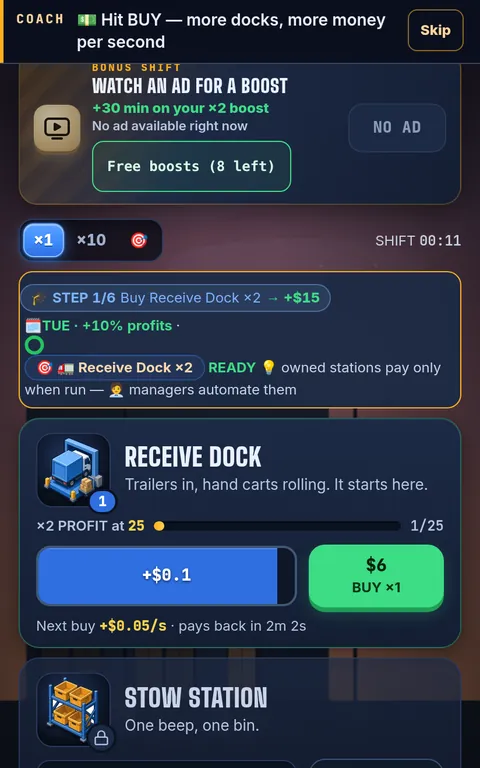
Phone: tap a station's big blue run bar to run it and the green BUY button to add units. The bottom bar switches between FLOOR, CREW, UPGRADES, JOBS and MORE (boosts, the Board Room, the calendar and settings). Desktop: click the same bars and buttons; the command panel on the left holds managers, upgrades and boosts, and the side rail switches views. Choose how many units each BUY press adds with ×1, ×10, ×100, 🎯 NEXT (exactly enough to reach the next milestone) or MAX. Press Esc to close pop-ups. Browsers keep sound off until your first tap or click; music and effects have separate sliders in ⚙️ Settings, and Settings → Motion & Effects tones down animation.
Your first ten minutes
You start with $10 and one Receive Dock. Tap its run bar: manual runs pay ×8 the automatic rate, and the tap bonus grows as you own more units. Spend early cash on more docks — the coach ticker and the six-step training chain point at the next move, and the goal line under your cash always names the next best purchase. After a few taps the training hires Rigo Rigs, the dock's manager, for free, and the dock starts running itself. Open the Stow Station at $90, then hire Bin Betty to automate it. From there the loop is the same at every scale: buy units, hire the manager, chase the next milestone.
Stations and milestones
There are ten stations, from the Receive Dock (2-second cycle) to the Delivery Fleet (8-minute cycle, paying millions per run). Every unit adds income, and unit counts of 25, 50, 100, 150, 200 and beyond are milestones that alternately double the station's profit and its speed. When every station reaches the same milestone, Crew Sync adds +25% profit to everything per tier. Exact prices and cycle times are in the station tables.
Managers
A station without a manager only runs when you tap it. Hire its manager in the CREW tab and it runs on its own — and keeps earning while you are offline, for up to 24 hours. Hired managers can be levelled up; each level doubles that station's profit.
Upgrades
The Upgrades tab sells one-time improvements: profit multipliers for one station or all of them, and speed boosts. Many stay locked until a station reaches a unit count — the lock tells you what to build next. A good rule: buy an upgrade when it costs less than about a minute of your income. See the upgrades guide.
Boosts: 8 free claims a day
Boosts are free. Each day you get 8 boost claims: open Boosts and tap 🎁 FREE on the one you want. Express Advance pays one hour of running income instantly (XL pays four), Rush Shift doubles all income for 15 minutes (or 2 hours), and Priority Contract doubles the parachutes from your next Go Public. Claims apply immediately and don't roll over to the next day. There is no shop and nothing to buy. Rewarded ads are not switched on yet; if they arrive, watching one will always be optional. More in the boosts guide.
Jobs, quests and events
The JOBS tab holds a board of three contracts: each one you finish pays cash plus a permanent +1% profit (up to +25%). Daily and weekly quests add more goals and rewards. Rush Orders and supply-chain jams pop up during play — tap a jammed station to clear it for a bonus. Every three days a two-hour Peak Season runs all stations 1.5× faster and earns crates that sell when it ends. Between 9 pm and 6 am your local time, the Night Shift adds +10% income.
The Shift Calendar
Each weekday has its own bonus, and logging in on consecutive days builds a streak — a 7-day streak adds a bonus Rush Shift and two extra free boost claims.
| Day | Bonus |
|---|---|
| Sunday | 2× contract cash |
| Monday | +10% speed |
| Tuesday | +10% profits |
| Wednesday | 2× Rush Orders |
| Thursday | manager hiring −10% |
| Friday | +20% profit and speed |
| Saturday | offline earnings +50% |
Going away: the Shift Report
Close the tab whenever you like. When you come back, the Shift Report adds up what every managed station earned while you were gone (up to 24 hours each, plus 50% on Saturdays). Press COLLECT to bank it, or DOUBLE IT, which uses one of your free boost claims. The offline earnings guide explains how to make the report bigger.
Go Public (prestige)
Once you've earned $5 quadrillion in a single run, the Board Room lets you Go Public. You trade the run — cash, stations, upgrades — for Golden Parachutes, and every parachute you have ever earned adds +10% to all income, permanently. Your hired managers, boosts, achievements and backdrops stay. The next run starts faster, and it gets faster every time. Try the Go Public calculator before you ring the bell.
Saving
The game saves to your browser automatically every few seconds. In ⚙️ Settings you can also keep PIN-code save slots, export a save code to move your empire by hand, or sign in with Google for optional cloud backup. Nothing is required to play.
Features at a glance
- Ten animated stations, each with its own art and sound, on a live warehouse floor that grows from a garage to a city HQ
- Ten managers with their own portraits and levels, 39 upgrades and 15 milestones
- Free daily boosts, contracts, daily and weekly quests, Peak Season, Rush Orders and the Shift Calendar
- Go Public prestige with Golden Parachutes and unlockable backdrops
- Plays on phones and desktops in any modern browser; saves automatically; optional cloud backup
- Free, with no in-app purchases
Still stuck? The FAQ covers saving, devices and troubleshooting, and the eight guides go deeper on every system.